Emma
Miles
Jacob
Wynter
Brighton
Treyson
Jaxson
Violet
Brenlie
Easton
Ryleigh
Kenzie M.
Liam
Ryker
Noah
Stevie
Dexter


Good morning and welcome to Favorite Things Friday! What is your favorite holiday?
Remember to complete each learning activity listed.
(Click on the blue words to access the videos or websites)
1. 8:30 am: Go to meet.google.com (make sure you are logged into your quest academy google account)
2. Wonders Language Arts Lesson Video
3. iReady READING: Go to clever.com and log in with your QR code found on the outside of your packet. Complete at least 15 minutes or more (Parents, please don’t give answers).
How to get to Clever/iReady Video
4. ECRI Phonics Lesson Part 1
5. Lunch Break
6. Math Lesson Video and then complete the Ready Math pages assigned in your video.
7. iReady MATH: Go to clever.com and log in with your QR code. Complete 15 minutes or more.
8. Heggerty Phonemic Awareness Lesson
9. 12:45 Final check in at meet.google.com
Additional Learning Ideas (Optional):
Ms. Smith is teaching today. Feel free to email me (Lsmith@questac.org) with any questions you have. I’ll be available via email from 8:00am to 4:00pm today. Happy learning!

Good morning and welcome back!
Remember to complete each learning activity listed.
(Click on the blue words to access the videos or websites)
1. 8:30 am: Go to meet.google.com (make sure you are logged into your quest academy google account)
2. Wonders Language Arts Lesson Video
 **Remember you can always find the books we are reading for the week on your Wonders Online Activities site (Blue circle with red book).
3. iReady READING: Go to clever.com and log in with your QR code found on the outside of your packet. Complete at least 15 minutes or more (Parents, please don’t give answers).
How to get to Clever/iReady Video
4. ECRI Phonics Lesson Part 1
ECRI Phonics Lesson Part 2
5. Lunch Break
6. Math Lesson Video
7. iReady MATH: Go to clever.com and log in with your QR code. Complete 15 minutes or more.
8. Heggerty Phonemic Awareness Lesson
9. Science Lesson: Look for the “Color Codes” Worksheet found in your packet. You also need a flashlight, a partner, and 3 markers (preferably 1 red, 1 blue, and 1 green…you can use three other colors, but make sure they are very different from one another).

10. 12:45 Final check in at meet.google.com
Additional Learning Ideas (Optional):
Mrs. Teichert is teaching today. Feel free to email me (lteichert@questac.org) with any questions you have. I’ll be available via email from 8:00am to 4:00pm today. Happy learning!
Quest Families,
As school will remain in dismissal until May 1st (as of now), teachers have prepared additional materials that can be picked up this Friday.
Pick up times are listed below. Please notice there are three different options, each lasting 2 hours. Rather than parking cars and walking to designated tables, parents will acquire their student’s materials by driving to tables by way of assigned lanes, which are alphabetized by student last name (see video).
Pick up times:
Friday: 7:30am to 9:30am; 11:30am to 1:30pm; 3:30pm to 5:30pm
Click here to watch the video.
Also, if your student checked out a Quest library book before this school closure, please return the library book when you pick-up your students’ school work.

Where’s Waldo Wednesday
Can you find Waldo? Ha ha! (Thanks Mrs. Barrett)
Good morning and welcome back!
Remember to complete each learning activity listed.
(Click on the blue words to access the videos or websites)
1. 8:30 am: Go to meet.google.com (make sure you are logged into your quest academy google account)
2. Wonders Language Arts Lesson Video
**Remember you can always find the books we are reading for the week on your Wonders Online Activities site (Blue circle with red book).
3. iReady READING: Go to clever.com and log in with your QR code found on the outside of your packet. Complete at least 15 minutes or more (Parents, please don’t give answers).
How to get to Clever/iReady Video
4. ECRI Phonics Lesson Part 1
ECRI Phonics Lesson Part 2
5. Lunch Break
6. Math Lesson Video
7. iReady MATH: Go to clever.com and log in with your QR code. Complete 15 minutes or more.
8. Heggerty Phonemic Awareness Lesson
9. Keyboard Lesson. Go to Typer Island and spend 10 or more minutes practicing.
How to Video
10. 12:45 Final check in at meet.google.com
Additional Learning Ideas (Optional):
*Pete the Cat loves to write back when he receives a letter. You can write a letter to Pete and send it to the address below. I wonder what Pete the Cat has to say! 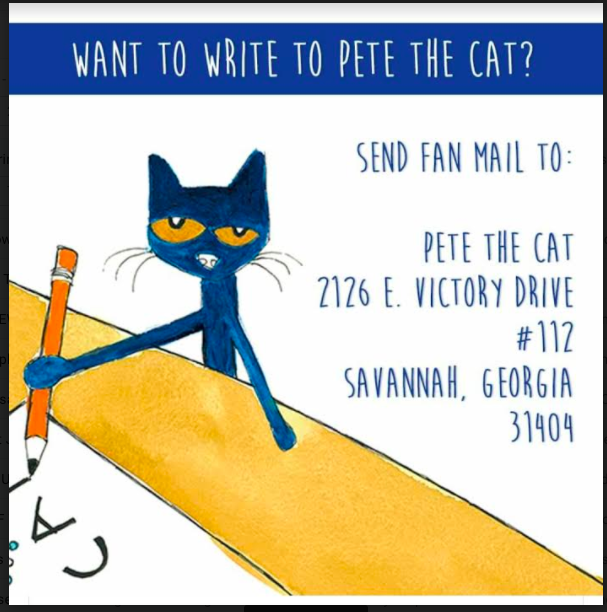
Mrs. Teichert is teaching today. Feel free to email me (lteichert@questac.org) with any questions you have. I’ll be available via email from 8:00am to 4:00pm today. Happy learning!
|
Hello my fabulous First Grade friends! Welcome to Tuesday’s lessons. Remember to complete each learning activity listed. (Click on the blue words to access the videos or websites)
1. 8:30 am: Go to meet.google.com (make sure you are logged into your quest academy google account)
2. Wonders Language Arts Lesson Video
3. iReady READING: Go to clever.com and log in with your QR code found on the outside of your packet. Complete at least 15 minutes or more (Parents, please don’t give answers).
How to get to Clever/iReady Video
4. ECRI Phonics Lesson Part 1
ECRI Phonics Lesson Part 2
5. Lunch Break
6. Math Lesson Video then Complete Ready Math Review Pages
7. iReady MATH: Go to clever.com and log in with your QR code. Complete 15 minutes or more.
8.Heggerty Phonemic Awareness Lesson
9. Science lesson on Plants:
Watch These Videos:
Learn about our Water Cycle: Earth’s water cycle
10. 12:45 Final check in at meet.google.com
Additional Learning Ideas: (Optional):
Reading Homework
Math Homework (“Dear Family” letter. Lesson 27)
Read for 20 minutes or more.
RAZ kids Click on “Kids Login”. Teacher’s Username: FirstRams
Wonders Online Activities
Video of Ms. Smith reading the book “Where The Wild Things Are”
Ms. Smith is teaching today. Feel free to email me (lsmith@questac.org) with any questions you have. I’ll be available via email from 8:00am to 4:00pm today. Happy learning!

Good morning and welcome back! I hope you had a great weekend!
Remember to complete each learning activity listed.
(Click on the blue words to access the videos or websites)
1. 8:30 am: Go to meet.google.com (make sure you are logged into your quest academy google account)
2. Wonders Language Arts Lesson Video
3. iReady READING: Go to clever.com and log in with your QR code found on the outside of your packet. Complete at least 15 minutes or more (Parents, please don’t give answers).
How to get to Clever/iReady Video
4. ECRI Phonics Lesson Part 1
ECRI Phonics Lesson Part 2
5. Lunch Break
6. Math Lesson Video
7. iReady MATH: Go to clever.com and log in with your QR code. Complete 15 minutes or more.
8. Heggerty Phonemic Awareness Lesson
9. 12:45 Final check in at meet.google.com
Additional Learning Ideas: (Optional):
Reading Homework
Math Homework (“Dear Family” letter. Lesson 27)
Read for 20 minutes or more.
RAZ kids Click on “Kids Login”. Teacher’s Username: FirstRams
Wonders Online Activities
STEM Challenge Idea
Watch this Mystery Doug video on how hand sanitizer works
Video of Ms. Smith reading the book “Mother Bruce”
Ms. Smith is teaching today. Feel free to email me (lsmith@questac.org) with any questions you have. I’ll be available via email from 8:00am to 4:00pm today. Happy learning!
|
|